---
title: '知识库接口'
description: 'FastGPT OpenAPI 知识库接口'
icon: 'dataset'
draft: false
toc: true
weight: 853
---
| 如何获取知识库ID(datasetId) | 如何获取文件集合ID(collection_id) |
| --------------------- | --------------------- |
|  |  |
## 创建训练订单
**请求示例**
```bash
curl --location --request POST 'https://api.fastgpt.in/api/support/wallet/bill/createTrainingBill' \
--header 'Authorization: Bearer {{apikey}}' \
--header 'Content-Type: application/json' \
--data-raw '{
"name": "可选,自定义订单名称,例如:文档训练-fastgpt.docx"
}'
```
**响应结果**
data 为 billId,可用于添加知识库数据时进行账单聚合。
```json
{
"code": 200,
"statusText": "",
"message": "",
"data": "65112ab717c32018f4156361"
}
```
## 知识库添加数据
{{< tabs tabTotal="4" >}}
{{< tab tabName="请求示例" >}}
{{< markdownify >}}
```bash
curl --location --request POST 'https://api.fastgpt.in/api/core/dataset/data/pushData' \
--header 'Authorization: Bearer apikey' \
--header 'Content-Type: application/json' \
--data-raw '{
"collectionId": "64663f451ba1676dbdef0499",
"trainingMode": "chunk",
"prompt": "可选。qa 拆分引导词,chunk 模式下忽略",
"billId": "可选。如果有这个值,本次的数据会被聚合到一个订单中,这个值可以重复使用。可以参考 [创建训练订单] 获取该值。",
"data": [
{
"q": "你是谁?",
"a": "我是FastGPT助手"
},
{
"q": "你会什么?",
"a": "我什么都会",
"indexes": [{
"type":"custom",
"text":"你好"
}]
}
]
}'
```
{{< /markdownify >}}
{{< /tab >}}
{{< tab tabName="参数说明" >}}
{{< markdownify >}}
需要先了解 FastGPT 的多路索引概念:
在 FastGPT 中,你可以为一组数据创建多个索引,如果不指定索引,则系统会自动取对应的 chunk 作为索引。例如前面的请求示例中:
`q:你是谁?a:我是FastGPT助手` 它的`indexes`属性为空,意味着不自定义索引,而是使用默认的索引(你是谁?\n我是FastGPT助手)。
在第二组数据中`q:你会什么?a:我什么都会`指定了一个`你好`的索引,因此这组数据的索引为`你好`。
```json
{
"collectionId": "文件集合的ID,参考上面的第二张图",
"mode": "chunk | qa ", // chunk 模式: 可自定义索引。qa 模型:无法自定义索引,会自动取 data 中的 q 作为数据,让模型自动生成问答对和索引。
"prompt": "QA 拆分提示词,需严格按照模板,建议不要传入。",
"data": [
{
"q": "生成索引的内容,index 模式下最大 tokens 为3000,建议不超过 1000",
"a": "预期回答/补充",
"indexes": "自定义索引",
},
{
"q": "xxx",
"a": "xxxx"
}
],
}
```
{{< /markdownify >}}
{{< /tab >}}
{{< tab tabName="响应例子" >}}
{{< markdownify >}}
```json
{
"code": 200,
"statusText": "",
"data": {
"insertLen": 1, // 最终插入成功的数量
"overToken": [], // 超出 token 的
"repeat": [], // 重复的数量
"error": [] // 其他错误
}
}
```
{{< /markdownify >}}
{{< /tab >}}
{{< tab tabName="QA Prompt 模板" >}}
{{< markdownify >}}
{{theme}} 里的内容可以换成数据的主题。默认为:它们可能包含多个主题内容
```
我会给你一段文本,{{theme}},学习它们,并整理学习成果,要求为:
1. 提出最多 25 个问题。
2. 给出每个问题的答案。
3. 答案要详细完整,答案可以包含普通文字、链接、代码、表格、公示、媒体链接等 markdown 元素。
4. 按格式返回多个问题和答案:
Q1: 问题。
A1: 答案。
Q2:
A2:
……
我的文本:"""{{text}}"""
```
{{< /markdownify >}}
{{< /tab >}}
{{< /tabs >}}
## 搜索测试
{{< tabs tabTotal="3" >}}
{{< tab tabName="请求示例" >}}
{{< markdownify >}}
```bash
curl --location --request POST 'https://api.fastgpt.in/api/core/dataset/searchTest' \
--header 'Authorization: Bearer fastgpt-xxxxx' \
--header 'Content-Type: application/json' \
--data-raw '{
"datasetId": "知识库的ID",
"text": "导演是谁",
"limit": 5000,
"similarity": 0,
"searchMode": "embedding",
"usingReRank": false
}'
```
{{< /markdownify >}}
{{< /tab >}}
{{< tab tabName="参数说明" >}}
{{< markdownify >}}
- datasetId - 知识库ID
- text - 需要测试的文本
- limit - 最大 tokens 数量
- similarity - 最低相关度(0~1,可选)
- searchMode - 搜索模式:embedding | fullTextRecall | mixedRecall
- usingReRank - 使用重排
{{< /markdownify >}}
{{< /tab >}}
{{< tab tabName="响应示例" >}}
{{< markdownify >}}
返回 top k 结果, limit 为最大 Tokens 数量,最多 20000 tokens。
```bash
{
"code": 200,
"statusText": "",
"data": [
{
"id": "65599c54a5c814fb803363cb",
"q": "你是谁",
"a": "我是FastGPT助手",
"datasetId": "6554684f7f9ed18a39a4d15c",
"collectionId": "6556cd795e4b663e770bb66d",
"sourceName": "GBT 15104-2021 装饰单板贴面人造板.pdf",
"sourceId": "6556cd775e4b663e770bb65c",
"score": 0.8050316572189331
},
......
]
}
```
{{< /markdownify >}}
{{< /tab >}}
{{< /tabs >}}
# 更多接口
目前未整理,简陋导出:
## POST 知识库搜索测试
POST /core/dataset/searchTest
> Body Parameters
```json
{
"datasetId": "656c2ccff7f114064daa72f6",
"text": "导演是谁",
"limit": 1500,
"searchMode": "embedding",
"usingReRank": true,
"similarity": 0.5
}
```
### Params
|Name|Location|Type|Required|Description|
|---|---|---|---|---|
|Authorization|header|string| no |none|
|body|body|object| no |none|
|» datasetId|body|string| yes |none|
|» text|body|string| yes |none|
|» limit|body|integer| no |none|
|» searchMode|body|[search mode](#schemasearch%20mode)| yes |none|
|» usingReRank|body|boolean| no |none|
|» similarity|body|[similary](#schemasimilary)| no |none|
> Response Examples
> 成功
```json
{
"code": 200,
"statusText": "",
"message": "",
"data": {
"list": [
{
"id": "65962b23f5fac58e46330dfd",
"q": "# 快速了解 FastGPT\nFastGPT 的能力与优势\n\nFastGPT 是一个基于 LLM 大语言模型的知识库问答系统,提供开箱即用的数据处理、模型调用等能力。同时可以通过 Flow 可视化进行工作流编排,从而实现复杂的问答场景!\n\n🤖\n\nFastGPT 在线使用:[https://fastgpt.in](https://fastgpt.in)\n\n| | |\n| --- | --- |\n|  |  |\n|  |  |\n\n",
"a": "",
"chunkIndex": 0,
"datasetId": "6593e137231a2be9c5603ba7",
"collectionId": "65962b2089642fd209da3b03",
"sourceName": "https://doc.fastgpt.in/docs/intro/",
"sourceId": "https://doc.fastgpt.in/docs/intro/",
"score": [
{
"type": "embedding",
"value": 0.8036568760871887,
"index": 20
},
{
"type": "fullText",
"value": 1.168349443855932,
"index": 2
},
{
"type": "reRank",
"value": 0.9870296135626316,
"index": 0
},
{
"type": "rrf",
"value": 0.04366449476962486,
"index": 0
}
]
},
{
"id": "65962b24f5fac58e46330dff",
"q": "# 快速了解 FastGPT\n## FastGPT 能力\n### 2. 简单易用的可视化界面\nFastGPT 采用直观的可视化界面设计,为各种应用场景提供了丰富实用的功能。通过简洁易懂的操作步骤,可以轻松完成 AI 客服的创建和训练流程。\n\n\n\n",
"a": "",
"chunkIndex": 2,
"datasetId": "6593e137231a2be9c5603ba7",
"collectionId": "65962b2089642fd209da3b03",
"sourceName": "https://doc.fastgpt.in/docs/intro/",
"sourceId": "https://doc.fastgpt.in/docs/intro/",
"score": [
{
"type": "embedding",
"value": 0.8152669668197632,
"index": 3
},
{
"type": "fullText",
"value": 1.0511363636363635,
"index": 8
},
{
"type": "reRank",
"value": 0.9287972729281414,
"index": 14
},
{
"type": "rrf",
"value": 0.04265696347031964,
"index": 1
}
]
},
{
"id": "65962b25f5fac58e46330e00",
"q": "# 快速了解 FastGPT\n## FastGPT 能力\n### 3. 自动数据预处理\n提供手动输入、直接分段、LLM 自动处理和 CSV 等多种数据导入途径,其中“直接分段”支持通过 PDF、WORD、Markdown 和 CSV 文档内容作为上下文。FastGPT 会自动对文本数据进行预处理、向量化和 QA 分割,节省手动训练时间,提升效能。\n\n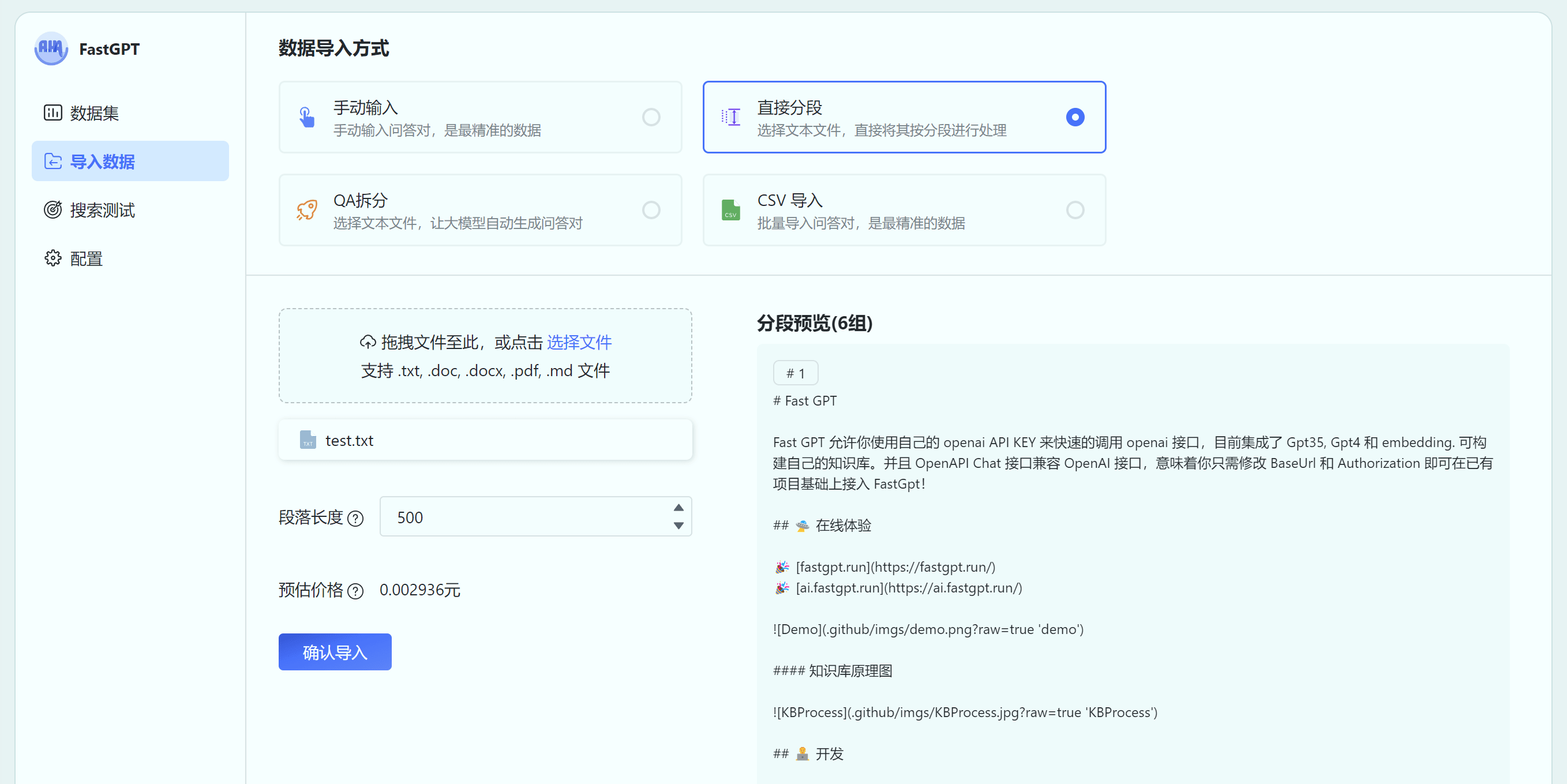\n\n",
"a": "",
"chunkIndex": 3,
"datasetId": "6593e137231a2be9c5603ba7",
"collectionId": "65962b2089642fd209da3b03",
"sourceName": "https://doc.fastgpt.in/docs/intro/",
"sourceId": "https://doc.fastgpt.in/docs/intro/",
"score": [
{
"type": "embedding",
"value": 0.8158369064331055,
"index": 2
},
{
"type": "fullText",
"value": 1.014030612244898,
"index": 20
},
{
"type": "reRank",
"value": 0.9064876908461501,
"index": 17
},
{
"type": "rrf",
"value": 0.04045823457588163,
"index": 2
}
]
},
{
"id": "65a7e1e8fc13bdf20fd46d41",
"q": "# 快速了解 FastGPT\n## FastGPT 能力\n### 5. 强大的 API 集成\nFastGPT 对外的 API 接口对齐了 OpenAI 官方接口,可以直接接入现有的 GPT 应用,也可以轻松集成到企业微信、公众号、飞书等平台。\n\n",
"a": "",
"chunkIndex": 66,
"datasetId": "6593e137231a2be9c5603ba7",
"collectionId": "65a7e1d4fc13bdf20fd46abe",
"sourceName": "dataset - 2024-01-04T151625.388.csv",
"sourceId": "65a7e1d2fc13bdf20fd46abc",
"score": [
{
"type": "embedding",
"value": 0.803692102432251,
"index": 18
},
{
"type": "fullText",
"value": 1.0511363636363635,
"index": 7
},
{
"type": "reRank",
"value": 0.9177460552422909,
"index": 15
},
{
"type": "rrf",
"value": 0.03970501147383226,
"index": 3
}
]
},
{
"id": "65a7be319d96e21823f69c9b",
"q": "FastGPT Flow 的工作流设计方案提供了哪些操作?",
"a": "FastGPT Flow 的工作流设计方案提供了数据预处理、各类 AI 应用设置、调试测试及结果反馈等操作。",
"chunkIndex": 0,
"datasetId": "6593e137231a2be9c5603ba7",
"collectionId": "65a7be059d96e21823f69af5",
"sourceName": "FastGPT软著.pdf",
"sourceId": "65a7be059d96e21823f69ae8",
"score": [
{
"type": "embedding",
"value": 0.8283981680870056,
"index": 0
},
{
"type": "reRank",
"value": 0.9620363047907355,
"index": 4
},
{
"type": "rrf",
"value": 0.03177805800756621,
"index": 4
}
]
},
{
"id": "65a7be389d96e21823f69d58",
"q": "FastGPT Flow 的实验室预约示例中使用了哪些参数?",
"a": "FastGPT Flow 的实验室预约示例中使用了姓名、时间和实验室名称等参数。",
"chunkIndex": 0,
"datasetId": "6593e137231a2be9c5603ba7",
"collectionId": "65a7be059d96e21823f69af5",
"sourceName": "FastGPT软著.pdf",
"sourceId": "65a7be059d96e21823f69ae8",
"score": [
{
"type": "embedding",
"value": 0.8143455386161804,
"index": 9
},
{
"type": "reRank",
"value": 0.9806919138043485,
"index": 1
},
{
"type": "rrf",
"value": 0.0304147465437788,
"index": 5
}
]
},
{
"id": "65a7be309d96e21823f69c78",
"q": "FastGPT Flow 是什么?",
"a": "FastGPT Flow 是一款基于大型语言模型的知识库问答系统,通过引入 Flow 可视化工作流编排技术,提供了一个即插即用的解决方案。",
"chunkIndex": 0,
"datasetId": "6593e137231a2be9c5603ba7",
"collectionId": "65a7be059d96e21823f69af5",
"sourceName": "FastGPT软著.pdf",
"sourceId": "65a7be059d96e21823f69ae8",
"score": [
{
"type": "embedding",
"value": 0.8115077018737793,
"index": 11
},
{
"type": "reRank",
"value": 0.9686195704870232,
"index": 3
},
{
"type": "rrf",
"value": 0.029513888888888888,
"index": 6
}
]
},
{
"id": "65a7be389d96e21823f69d5e",
"q": "FastGPT Flow 的实验室预约示例中的代码实现了哪些功能?",
"a": "FastGPT Flow 的实验室预约示例中的代码实现了预约实验室、修改预约、查询预约和取消预约等功能。",
"chunkIndex": 0,
"datasetId": "6593e137231a2be9c5603ba7",
"collectionId": "65a7be059d96e21823f69af5",
"sourceName": "FastGPT软著.pdf",
"sourceId": "65a7be059d96e21823f69ae8",
"score": [
{
"type": "embedding",
"value": 0.8166953921318054,
"index": 1
},
{
"type": "reRank",
"value": 0.8350804533361768,
"index": 20
},
{
"type": "rrf",
"value": 0.028474711270410194,
"index": 8
}
]
},
{
"id": "65a7be389d96e21823f69d4f",
"q": "FastGPT Flow 的联网搜索示例中使用了哪些参数?",
"a": "FastGPT Flow 的联网搜索示例中使用了搜索关键词、Google 搜索的 API 密钥和自定义搜索引擎 ID。",
"chunkIndex": 0,
"datasetId": "6593e137231a2be9c5603ba7",
"collectionId": "65a7be059d96e21823f69af5",
"sourceName": "FastGPT软著.pdf",
"sourceId": "65a7be059d96e21823f69ae8",
"score": [
{
"type": "embedding",
"value": 0.8025297522544861,
"index": 21
},
{
"type": "reRank",
"value": 0.9730876959261983,
"index": 2
},
{
"type": "rrf",
"value": 0.028068137824235385,
"index": 10
}
]
},
{
"id": "65a7e1e8fc13bdf20fd46d55",
"datasetId": "6593e137231a2be9c5603ba7",
"collectionId": "65a7e1d4fc13bdf20fd46abe",
"sourceName": "dataset - 2024-01-04T151625.388.csv",
"sourceId": "65a7e1d2fc13bdf20fd46abc",
"q": "# 快速了解 FastGPT\n## FastGPT 特点\n1. **项目开源**\n \n FastGPT 遵循附加条件 Apache License 2.0 开源协议,你可以 [Fork](https://github.com/labring/FastGPT/fork) 之后进行二次开发和发布。FastGPT 社区版将保留核心功能,商业版仅在社区版基础上使用 API 的形式进行扩展,不影响学习使用。\n \n2. **独特的 QA 结构**\n \n 针对客服问答场景设计的 QA 结构,提高在大量数据场景中的问答准确性。\n \n3. **可视化工作流**\n \n 通过 Flow 模块展示了从问题输入到模型输出的完整流程,便于调试和设计复杂流程。\n \n4. **无限扩展**\n \n 基于 API 进行扩展,无需修改 FastGPT 源码,也可快速接入现有的程序中。\n \n5. **便于调试**\n \n 提供搜索测试、引用修改、完整对话预览等多种调试途径。\n \n6. **支持多种模型**\n \n 支持 GPT、Claude、文心一言等多种 LLM 模型,未来也将支持自定义的向量模型。",
"a": "",
"chunkIndex": 67,
"score": [
{
"type": "fullText",
"value": 1.0340073529411764,
"index": 12
},
{
"type": "reRank",
"value": 0.9542227274192233,
"index": 9
},
{
"type": "rrf",
"value": 0.027272727272727275,
"index": 11
}
]
},
{
"id": "65a7be319d96e21823f69c8f",
"q": "FastGPT Flow 的工作流设计中,模块之间如何进行组合和组装?",
"a": "FastGPT Flow 允许用户在核心工作流模块中进行自由组合和组装,从而衍生出一个新的模块。",
"chunkIndex": 0,
"datasetId": "6593e137231a2be9c5603ba7",
"collectionId": "65a7be059d96e21823f69af5",
"sourceName": "FastGPT软著.pdf",
"sourceId": "65a7be059d96e21823f69ae8",
"score": [
{
"type": "embedding",
"value": 0.8098832368850708,
"index": 13
},
{
"type": "reRank",
"value": 0.9478657435317039,
"index": 12
},
{
"type": "rrf",
"value": 0.027212143650499815,
"index": 12
}
]
},
{
"id": "65a7be359d96e21823f69ce0",
"q": "FastGPT Flow 的模块的输入和输出如何连接?",
"a": "FastGPT Flow 的模块的输入和输出通过连接点进行连接,连接点的颜色代表了不同的数据类型。",
"chunkIndex": 0,
"datasetId": "6593e137231a2be9c5603ba7",
"collectionId": "65a7be059d96e21823f69af5",
"sourceName": "FastGPT软著.pdf",
"sourceId": "65a7be059d96e21823f69ae8",
"score": [
{
"type": "embedding",
"value": 0.8060981035232544,
"index": 16
},
{
"type": "reRank",
"value": 0.9530133603823691,
"index": 10
},
{
"type": "rrf",
"value": 0.027071520029266508,
"index": 13
}
]
},
{
"id": "65a7be319d96e21823f69c98",
"q": "FastGPT Flow 的工作流设计方案能够满足哪些问答场景?",
"a": "FastGPT Flow 的工作流设计方案能够满足基本的 AI 知识库问答需求,并适应各种复杂的问答场景,例如联网搜索、数据库操作、数据实时更新、消息通知等。",
"chunkIndex": 0,
"datasetId": "6593e137231a2be9c5603ba7",
"collectionId": "65a7be059d96e21823f69af5",
"sourceName": "FastGPT软著.pdf",
"sourceId": "65a7be059d96e21823f69ae8",
"score": [
{
"type": "embedding",
"value": 0.814436137676239,
"index": 8
},
{
"type": "reRank",
"value": 0.8814109034236719,
"index": 19
},
{
"type": "rrf",
"value": 0.026992753623188405,
"index": 16
}
]
},
{
"id": "65a7e058fc13bdf20fd46577",
"datasetId": "6593e137231a2be9c5603ba7",
"collectionId": "65a7e01efc13bdf20fd45815",
"sourceName": "FastGPT软著.pdf",
"sourceId": "65a7e01dfc13bdf20fd457f3",
"q": "FastGPT Flow 工作流设计112312 3123213123 232321312 21312 23一、介绍FastGPT 作为一款基于大型语言模型(LLM)的知识库问答系统,旨在为用户提供一个即插即用的解决方案。它集成了数据处理、模型调用等多项功能,通过引入 Flow 可视化工作流编排技术,进一步增强了对复杂问答场景的支持能力。本文将重点介绍 FastGPT Flow工作流的设计方案和应用优势。\nFastGPT Flow 工 作 流 采 用 了 React Flow 框 架 作 为 UI 底 座 , 结 合 自 研 的 FlowController 实现工作流的运行。FastGPT 使用 Flow 模块为用户呈现了一个直观、可视化的界面,从而简化了 AI 应用工作流程的设计和管理方式。React Flow 的应用使得用户能够以图形化的方式组织和编排工作流,这不仅使得工作流的创建过程更为直观,同时也为用户提供了强大且灵活的工作流编辑器。在 FastGPT Flow 工作流设计中,核心工作流模块包括用户引导、问题输入、知识库检索、AI 文本生成、问题分类、结构化内容提取、指定回复、应用调用和 HTTP 扩展,并允许用户在这类模块中进行自由组合和组装,从而衍生出一个新的模块。",
"a": "",
"chunkIndex": 0,
"score": [
{
"type": "fullText",
"value": 1.0229779411764706,
"index": 15
},
{
"type": "reRank",
"value": 0.9577545043363116,
"index": 8
},
{
"type": "rrf",
"value": 0.026992753623188405,
"index": 17
}
]
}
],
"duration": "2.978s",
"searchMode": "mixedRecall",
"limit": 1500,
"similarity": 0.1,
"usingReRank": true,
"usingSimilarityFilter": true
}
}
```
### Responses
|HTTP Status Code |Meaning|Description|Data schema|
|---|---|---|---|
|200|[OK](https://tools.ietf.org/html/rfc7231#section-6.3.1)|成功|Inline|
### Responses Data Schema
HTTP Status Code **200**
|Name|Type|Required|Restrictions|Title|description|
|---|---|---|---|---|---|
|» code|integer|true|none||none|
|» statusText|string|true|none||none|
|» message|string|true|none||none|
|» data|object|true|none||none|
|»» list|[object]|true|none||none|
|»»» id|string|true|none||none|
|»»» q|string|true|none||none|
|»»» a|string|true|none||none|
|»»» chunkIndex|integer|true|none||none|
|»»» datasetId|string|true|none||none|
|»»» collectionId|string|true|none||none|
|»»» sourceName|string|true|none||none|
|»»» sourceId|string|true|none||none|
|»»» score|[object]|true|none||none|
|»»»» type|string|true|none||none|
|»»»» value|number|true|none||none|
|»»»» index|integer|true|none||none|
|»» duration|string|true|none||none|
|»» searchMode|string|true|none||none|
|»» limit|integer|true|none||none|
|»» similarity|number|true|none||none|
|»» usingReRank|boolean|true|none||none|
|»» usingSimilarityFilter|boolean|true|none||none|
# openapi/知识库/知识库crud
## GET 获取知识库列表
GET /core/dataset/list
### Params
|Name|Location|Type|Required|Description|
|---|---|---|---|---|
|parentId|query|string| no |父级的ID|
|Authorization|header|string| no |none|
> Response Examples
> 200 Response
```json
{}
```
### Responses
|HTTP Status Code |Meaning|Description|Data schema|
|---|---|---|---|
|200|[OK](https://tools.ietf.org/html/rfc7231#section-6.3.1)|成功|Inline|
### Responses Data Schema
## GET 获取知识库详情
GET /core/dataset/detail
### Params
|Name|Location|Type|Required|Description|
|---|---|---|---|---|
|id|query|string| no |知识库id|
|Authorization|header|string| no |none|
> Response Examples
> 200 Response
```json
{}
```
### Responses
|HTTP Status Code |Meaning|Description|Data schema|
|---|---|---|---|
|200|[OK](https://tools.ietf.org/html/rfc7231#section-6.3.1)|成功|Inline|
### Responses Data Schema
# openapi/知识库/集合crud
## POST 获取知识库集合列表
POST /core/dataset/collection/list
> Body Parameters
```json
{
"pageNum": 1,
"pageSize": 10,
"datasetId": "6597ca43e26f2a90a1501414",
"parentId": null,
"searchText": "",
"simple": true
}
```
### Params
|Name|Location|Type|Required|Description|
|---|---|---|---|---|
|Authorization|header|string| no |none|
|body|body|object| no |none|
|» pageNum|body|integer| no |none|
|» pageSize|body|integer| no |none|
|» datasetId|body|string| yes |none|
|» parentId|body|null| no |none|
|» searchText|body|string| no |none|
|» simple|body|boolean| no |none|
> Response Examples
> 200 Response
```json
{}
```
### Responses
|HTTP Status Code |Meaning|Description|Data schema|
|---|---|---|---|
|200|[OK](https://tools.ietf.org/html/rfc7231#section-6.3.1)|成功|Inline|
### Responses Data Schema
## GET 获取集合详情
GET /core/dataset/collection/detail
### Params
|Name|Location|Type|Required|Description|
|---|---|---|---|---|
|id|query|string| no |知识库id|
|Authorization|header|string| no |none|
> Response Examples
> 200 Response
```json
{}
```
### Responses
|HTTP Status Code |Meaning|Description|Data schema|
|---|---|---|---|
|200|[OK](https://tools.ietf.org/html/rfc7231#section-6.3.1)|成功|Inline|
### Responses Data Schema
## PUT 更新集合
PUT /core/dataset/collection/update
> Body Parameters
```json
{
"id": "6597ce094e10ee661f0891c8",
"parentId": null,
"name": "222"
}
```
### Params
|Name|Location|Type|Required|Title|Description|
|---|---|---|---|---|---|
|Authorization|header|string| no ||none|
|body|body|object| no ||none|
|» id|body|string| yes ||none|
|» parentId|body|null| no | 父级的id|none|
|» name|body|string| no | 名称|none|
> Response Examples
> 200 Response
```json
{}
```
### Responses
|HTTP Status Code |Meaning|Description|Data schema|
|---|---|---|---|
|200|[OK](https://tools.ietf.org/html/rfc7231#section-6.3.1)|成功|Inline|
### Responses Data Schema
## POST 创建空集合(文件夹或者一个空集合)
POST /core/dataset/collection/create
> Body Parameters
```json
{
"datasetId": "6597ca43e26f2a90a1501414",
"parentId": null,
"name": "集合名",
"type": "folder",
"metadata": {}
}
```
### Params
|Name|Location|Type|Required|Title|Description|
|---|---|---|---|---|---|
|Authorization|header|string| no ||none|
|body|body|object| no ||none|
|» datasetId|body|string| yes ||none|
|» parentId|body|null| no ||none|
|» name|body|string| yes ||none|
|» type|body|[collection type](#schemacollection%20type)| yes ||none|
|» metadata|body|object| no ||none|
> Response Examples
> 200 Response
```json
{}
```
### Responses
|HTTP Status Code |Meaning|Description|Data schema|
|---|---|---|---|
|200|[OK](https://tools.ietf.org/html/rfc7231#section-6.3.1)|成功|Inline|
### Responses Data Schema
## POST 创建文本集合
POST /core/dataset/collection/create/text
> Body Parameters
```json
{
"text": "xxxxxxxxxxxxxx",
"datasetId": "6593e137231a2be9c5603ba7",
"parentId": null,
"name": "测试",
"trainingType": "qa",
"chunkSize": 8000,
"chunkSplitter": "",
"qaPrompt": "",
"metadata": {}
}
```
### Params
|Name|Location|Type|Required|Title|Description|
|---|---|---|---|---|---|
|Authorization|header|string| no ||none|
|body|body|object| no ||none|
|» datasetId|body|string| no ||none|
|» parentId|body|null| no ||none|
|» name|body|string| yes ||none|
|» text|body|string| yes | 原文本|none|
|» trainingType|body|[training type](#schematraining%20type)| yes ||none|
|» chunkSize|body|integer| no | 分块大小|none|
|» chunkSplitter|body|string| no | 自定义最高优先级的分段符号|none|
|» qaPrompt|body|string| no ||none|
|» metadata|body|object| no ||none|
> Response Examples
> 200 Response
```json
{}
```
### Responses
|HTTP Status Code |Meaning|Description|Data schema|
|---|---|---|---|
|200|[OK](https://tools.ietf.org/html/rfc7231#section-6.3.1)|成功|Inline|
### Responses Data Schema
## POST 创建网络链接集合
POST /core/dataset/collection/create/link
> Body Parameters
```json
{
"link": "https://doc.fastgpt.in/docs/course/quick-start/",
"datasetId": "6593e137231a2be9c5603ba7",
"parentId": null,
"trainingType": "chunk",
"chunkSize": 512,
"chunkSplitter": "",
"qaPrompt": "",
"metadata": {
"webPageSelector": ".docs-content"
}
}
```
### Params
|Name|Location|Type|Required|Title|Description|
|---|---|---|---|---|---|
|Authorization|header|string| no ||none|
|body|body|object| no ||none|
|» datasetId|body|string| yes ||none|
|» parentId|body|null| no ||none|
|» link|body|string| yes ||none|
|» trainingType|body|[training type](#schematraining%20type)| yes ||none|
|» chunkSize|body|integer| no ||none|
|» chunkSplitter|body|string| no ||none|
|» qaPrompt|body|string| no ||none|
|» metadata|body|object| no ||none|
|»» webPageSelector|body|string| no | web选择器|none|
> Response Examples
> 200 Response
```json
{}
```
### Responses
|HTTP Status Code |Meaning|Description|Data schema|
|---|---|---|---|
|200|[OK](https://tools.ietf.org/html/rfc7231#section-6.3.1)|成功|Inline|
### Responses Data Schema
## DELETE 删除一个集合
DELETE /core/dataset/collection/delete
### Params
|Name|Location|Type|Required|Title|Description|
|---|---|---|---|---|---|
|id|query|string| no ||知识库id|
|Authorization|header|string| no ||none|
> Response Examples
> 200 Response
```json
{}
```
### Responses
|HTTP Status Code |Meaning|Description|Data schema|
|---|---|---|---|
|200|[OK](https://tools.ietf.org/html/rfc7231#section-6.3.1)|成功|Inline|
### Responses Data Schema
# openapi/知识库/数据crud
## POST 获取数据列表
POST /core/dataset/data/list
> Body Parameters
```json
{
"pageNum": 1,
"pageSize": 10,
"collectionId": "65a8d2700d70d3de0bf09186",
"searchText": ""
}
```
### Params
|Name|Location|Type|Required|Title|Description|
|---|---|---|---|---|---|
|Authorization|header|string| no ||none|
|body|body|object| no ||none|
|» pageNum|body|integer| yes ||none|
|» pageSize|body|integer| yes ||none|
|» searchText|body|string| yes ||none|
|» collectionId|body|string| yes ||none|
> Response Examples
> 200 Response
```json
{}
```
### Responses
|HTTP Status Code |Meaning|Description|Data schema|
|---|---|---|---|
|200|[OK](https://tools.ietf.org/html/rfc7231#section-6.3.1)|成功|Inline|
### Responses Data Schema
## GET 获取数据详情
GET /core/dataset/data/detail
### Params
|Name|Location|Type|Required|Title|Description|
|---|---|---|---|---|---|
|id|query|string| yes ||none|
|Authorization|header|string| no ||none|
> Response Examples
> 200 Response
```json
{}
```
### Responses
|HTTP Status Code |Meaning|Description|Data schema|
|---|---|---|---|
|200|[OK](https://tools.ietf.org/html/rfc7231#section-6.3.1)|成功|Inline|
### Responses Data Schema
## DELETE 删除一条数据
DELETE /core/dataset/data/delete
### Params
|Name|Location|Type|Required|Title|Description|
|---|---|---|---|---|---|
|id|query|string| no ||none|
|Authorization|header|string| no ||none|
> Response Examples
> 200 Response
```json
{}
```
### Responses
|HTTP Status Code |Meaning|Description|Data schema|
|---|---|---|---|
|200|[OK](https://tools.ietf.org/html/rfc7231#section-6.3.1)|成功|Inline|
### Responses Data Schema
## PUT 更新数据
PUT /core/dataset/data/update
> Body Parameters
```json
{
"id": "6597ce094e10ee661f0891c8",
"parentId": null,
"name": "222"
}
```
### Params
|Name|Location|Type|Required|Title|Description|
|---|---|---|---|---|---|
|Authorization|header|string| no ||none|
|body|body|object| no ||none|
|» id|body|string| yes ||none|
|» q|body|string| yes ||none|
|» a|body|string| no ||none|
|» indexes|body|[[数据自定义向量](#schema%e6%95%b0%e6%8d%ae%e8%87%aa%e5%ae%9a%e4%b9%89%e5%90%91%e9%87%8f)]| no ||none|
> Response Examples
> 200 Response
```json
{}
```
### Responses
|HTTP Status Code |Meaning|Description|Data schema|
|---|---|---|---|
|200|[OK](https://tools.ietf.org/html/rfc7231#section-6.3.1)|成功|Inline|
### Responses Data Schema
## POST 知识库插入记录(批量插入)
POST /core/dataset/data/pushData
> Body Parameters
```json
{
"collectionId": "string",
"data": [
{
"a": "string",
"q": "string",
"chunkIndex": 1
}
],
"trainingMode": "string",
"promot": "string",
"billId": ""
}
```
### Params
|Name|Location|Type|Required|Title|Description|
|---|---|---|---|---|---|
|Authorization|header|string| no ||none|
|body|body|object| no ||none|
|» collectionId|body|string| yes ||none|
|» data|body|[object]| yes ||none|
|»» a|body|string| no ||none|
|»» q|body|string| no ||none|
|»» chunkIndex|body|integer| no ||none|
|» trainingMode|body|[training type](#schematraining%20type)| no ||none|
|» promot|body|string| no ||none|
|» billId|body|string| no ||none|
> Response Examples
> 200 Response
```json
{}
```
### Responses
|HTTP Status Code |Meaning|Description|Data schema|
|---|---|---|---|
|200|[OK](https://tools.ietf.org/html/rfc7231#section-6.3.1)|成功|Inline|
### Responses Data Schema
# Data Schema
similary
```json
1
```
### Attribute
|Name|Type|Required|Restrictions|Title|Description|
|---|---|---|---|---|---|
|*anonymous*|integer|false|none||none|
search mode
```json
"embedding"
```
### Attribute
|Name|Type|Required|Restrictions|Title|Description|
|---|---|---|---|---|---|
|*anonymous*|string|false|none||none|
#### Enum
|Name|Value|
|---|---|
|*anonymous*|embedding|
|*anonymous*|fullTextRecall|
|*anonymous*|mixedRecall|
training type
```json
"chunk"
```
### Attribute
|Name|Type|Required|Restrictions|Title|Description|
|---|---|---|---|---|---|
|*anonymous*|string|false|none||none|
#### Enum
|Name|Value|
|---|---|
|*anonymous*|chunk|
|*anonymous*|qa|
collection type
```json
"folder"
```
### Attribute
|Name|Type|Required|Restrictions|Title|Description|
|---|---|---|---|---|---|
|*anonymous*|string|false|none||none|
#### Enum
|Name|Value|
|---|---|
|*anonymous*|folder|
|*anonymous*|virtual|
|*anonymous*|link|
|*anonymous*|file|
数据自定义向量
```json
{
"defaultIndex": true,
"type": "string",
"text": "string"
}
```
### Attribute
|Name|Type|Required|Restrictions|Title|Description|
|---|---|---|---|---|---|
|defaultIndex|boolean|false|none||是否为默认|
|type|string|true|none||none|
|text|string|true|none||索引文本|